A practical definition

What exactly is Higgsfield AI? A practical definition

Higgsfield AI is a creative video platform for turning written direction, images, and visual references into stylized moving scenes. It helps shape an idea quickly, but it does not replace a complete production workflow.

Text
Creative direction
Image
Visual references
Video
Moving scene output

Higgsfield AI in one line

Higgsfield AI is a generative video workspace that helps creators move from a visual brief to an animated concept, using prompts and references to guide camera, character, and scene decisions.

What it can and cannot do

The platform is useful for exploration and visual development, but its results still depend on the input, model behavior, and the amount of human review applied afterward.

It cannot guarantee exact continuity

Characters, clothing, props, and environments may shift between frames or attempts, especially in complex scenes.

Workaround

Use clear reference images, repeat key descriptors, and select the strongest shots for a short sequence.

It cannot replace a full editor

Generation is only one part of production. Timing, sound, captions, brand checks, and final assembly still need deliberate editing.

Workaround

Treat the generated clip as source material and finish it in a video editor suited to your delivery format.

It cannot infer every creative intention

A short prompt may leave camera position, subject behavior, pacing, or visual style open to interpretation.

Workaround

Specify the subject, action, setting, lens feel, movement, lighting, and mood in separate phrases.

It cannot make every idea production-ready

Some outputs are better as storyboards, mood references, or experiments than as final commercial footage.

Workaround

Use it early to test direction, then refine viable concepts with stronger references and human supervision.

How it works

The workflow is built around translating intent into a visual result, reviewing the result, and then refining the direction rather than expecting one perfect generation.

  1. 1

    Describe the visual idea

    Start with the subject, setting, action, atmosphere, and intended camera behavior. A concrete brief gives the system more useful signals than a vague request.

  2. 2

    Guide the generation

    Add a reference image or visual constraints when the look, composition, or identity matters. The platform interprets those instructions into a moving scene or concept.

  3. 3

    Review and refine

    Check motion, continuity, framing, and emotional tone. Keep useful results, revise weak instructions, and iterate until the clip supports the original creative goal.

From brief to visual direction

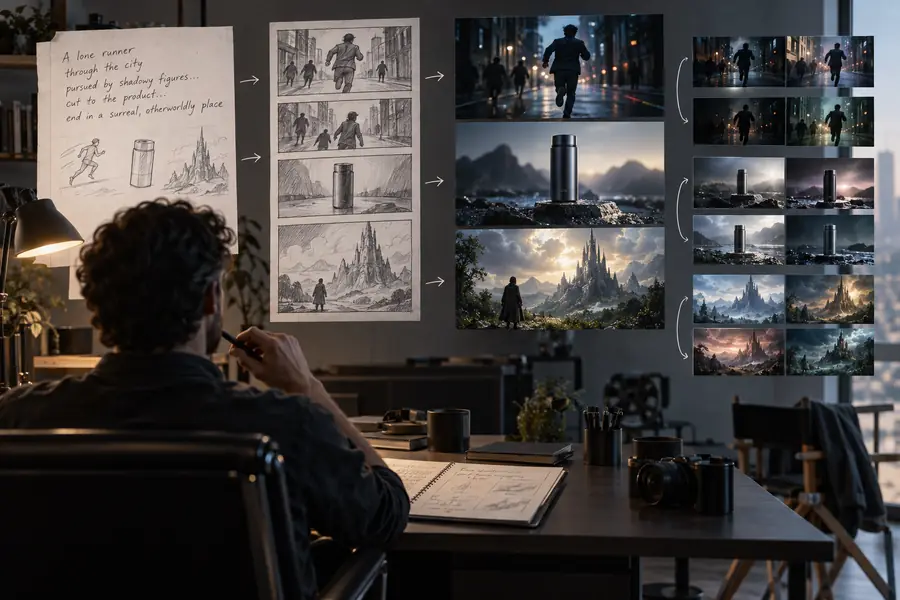
A useful way to understand the platform is to compare an underspecified idea with a directed one: the second gives the system more decisions to preserve.

An initial visual concept for an AI video scene Loose concept
A more directed cinematic moving scene Directed concept
Specific direction usually produces a more usable starting point.

Who uses it

Different users approach the platform with different production goals, but the common thread is faster visual exploration before committing to a finished shoot or edit.

Short-form creator

A creator wants several opening shots for a social video without filming every visual idea.

They can test hooks, moods, and camera concepts before choosing a direction. The broader [higgsfield ai video] workflow is useful when the idea needs to become a complete clip.

higgsfield ai video

Brand marketer

A small marketing team needs concept visuals for a product launch, campaign board, or internal pitch.

Generated scenes help the team compare visual routes quickly, while people retain control over claims, brand consistency, and final approvals. See [higgsfield ai examples] for related creative applications.

higgsfield ai examples

Director or storyboard artist

A filmmaker wants to communicate a camera move, atmosphere, or transition before production begins.

Motion tests can make an abstract idea easier to discuss with collaborators. [higgsfield ai motion control] is the more focused route when movement and camera direction are central.

higgsfield ai motion control

Visual designer

A designer is exploring character, environment, or editorial video treatments from a small set of references.

The platform can create a wider visual range from an initial mood, helping the designer decide which direction deserves further refinement. The [higgsfield ai online app] route is suited to browser-based exploration.

higgsfield ai online app

What the workflow produces

These are useful ways to frame the output: not as a promise of finished production, but as progressively clearer visual material for decisions.

A written idea establishes the subject and intent.
01 brief
References and constraints narrow the visual direction.
02 guides
Human review separates useful footage from failed attempts.
03 checks
Selected concepts move into editing, approval, or production.
04 next steps

Higgsfield AI FAQ

Here are concise answers to the central definition question and the practical distinctions that usually follow it.

Higgsfield AI is a generative video platform for creating and exploring moving visual concepts from written prompts, images, and other creative direction. It is best understood as an ideation and production-support tool rather than an automatic replacement for every part of filmmaking.

Its main role is generative video creation and visual development, although a creator may use its outputs inside a broader editing workflow. Final timing, sound, captions, sequencing, and delivery usually require additional tools or manual work.

It can help develop cinematic concepts, motion tests, social-video ideas, product visuals, storyboards, and reference material for a larger production. The strongest use is often fast iteration: testing several visual directions before investing more time or resources.

Not reliably every time. Generative systems can reinterpret details, change continuity, or miss an intended camera move, so clear instructions, useful references, and repeated review are important for getting closer to the desired result.

It can serve creators, marketers, designers, directors, and teams that need to visualize an idea quickly. People who need strict frame-by-frame control or fully finished, publication-ready video may still need conventional production and editing tools alongside it.

Start creating
Start creating